Archive for August, 2009|Monthly archive page
Web/App-server scalability with memcached (Part 1)
Filed under: software | Tags: cache, caching, java, memcache, memcached, scalability, web applications
 Comments (1)
 This is a two part series in which I am going to explain how to use caching to improve the scalability of your web applications. Most of this can be found on the Internet as different articles or blogs and I have tried to condense all the information from my experiences into these posts. In this post I will try to describe the problem and provide a brief introduction/tutorial on the caching framework (or is it a tool) of my choice – memcached.
A typical web-based application – unless it is really really trivial – usually has a significant number of users using the application and hence at some point of time or other, one has to address the issue of application scalability (i.e. handling large load – usually large number of users simultaneously using the system). Let us walk through a couple of examples to provide a better description of what I am trying to say here.
Let us consider an e-commerce site like Target and when each user visits the main web page (www.target.com), the web-server needs to figure out what are the specials being advertised (as big flash ads, e.g. HDTV, Indoors, etc.), what are the “New Products” at Target, and so on. The web-server looks up this information in a database and serves up these ads (with text, images, etc.). This content is pretty much static for every user who visits the main page of Target, and considering that target.com probably gets more than a million visitors per day, that is a lot of load on the database for the same kind (in fact, identical) of information. This usually implies slower response times, which in turn has disastrous consequences (customers who are ready to pay for something usually have very little patience with slow websites).
Now let us consider an online brokerage site where an user logs in and is presented with a summary of his/her net value (cash + stock), and then he/she can click on various tabs to view cash deposits/withdrawals, recent stock transactions, place trades, and so on. Once again all this information is stored in the database, and this is different from the Target example, as the information will be different for every user that is logged in. And once again when there are a lot of users logged in, the database will have a lot of load (i.e. lot of queries executed against it) when these users go about clicking on different tabs to look at their total assets or trade history.
The most common solution to both of the above problems is caching, and that is what I am going to talk about in these series of posts – specifically about implementing a distributed caching solution using memcached. The memcached project was started at Danga but is currently being actively hosted on Google Code. I haven’t seen any binary downloads offered (yet) on the downloads page, but one can play around with a Win32 binary (version 1.2.6) from here. Just go to the middle of the page where it says memcached-1.2.6 and click on the memcached-1.2.6-win32-bin.zip link. Just unzip the download and place the memcached.exe at an appropriate location on your computer (see image below).

Memcached unzipped and saved
Now you can start memcached by bringing up a command prompt (cmd window) and typing : “memcached -m 1024 -p 11211”. This starts memcached on your local machine on port 11211 and assigns it 1024 MB (1 GB) of memory (this is the maximum amount of memory it uses for storing objects in its cache). You can start storing objects in memcached by using various client APIs (PHP, Perl, Java, etc.) – I prefer coding in Java, so I decided to use the Java client API (Version 2.0.1.) from here. This how-to is really useful, and since I don’t have access to multiple machines (on which I can run memcached), I basically start three different instances of memcached on the same machine but on different ports (see image below). Then I use a java class (see code snippet below – slightly modified from the how-to) to add a couple of objects (key:”foo”, value:”This is test String foo”, and key:”bar”, value:”This is test String bar”) and retrieve them from the cache.

Memcached running on different ports
Sample client code that adds and retrieves objects from memcached cluster.
package org.karticks.memcache;

import com.danga.MemCached.MemCachedClient;
import com.danga.MemCached.SockIOPool;


// Modified version of the original example at
// http://www.whalin.com/memcached/HOWTO.txt
public class ClientExample
{
	// create a static client as most installs only need a single instance
	protected static MemCachedClient mcc = new MemCachedClient();

	// set up connection pool once at class load
	static
	{

		// server list and weights
		String[] servers = { "localhost:11211", "localhost:11212", "localhost:11213" };

		Integer[] weights = { 3, 3, 2 };

		// grab an instance of our connection pool
		SockIOPool pool = SockIOPool.getInstance();

		// set the servers and the weights
		pool.setServers(servers);
		pool.setWeights(weights);

		// set some basic pool settings
		// 5 initial, 5 min, and 250 max conns
		// and set the max idle time for a conn
		// to 6 hours
		pool.setInitConn(5);
		pool.setMinConn(5);
		pool.setMaxConn(250);
		pool.setMaxIdle(1000 * 60 * 60 * 6);

		// set the sleep for the maint thread
		// it will wake up every x seconds and
		// maintain the pool size
		pool.setMaintSleep(30);

		// set some TCP settings
		// disable nagle
		// set the read timeout to 3 secs
		// and don't set a connect timeout
		pool.setNagle(false);
		pool.setSocketTO(3000);
		pool.setSocketConnectTO(0);

		// initialize the connection pool
		pool.initialize();

		// lets set some compression on for the client
		// compress anything larger than 64k
		mcc.setCompressEnable(true);
		mcc.setCompressThreshold(64 * 1024);
	}

	// from here on down, you can call any of the client calls
	public static void main(String[] args)
	{
		try
		{
			String input = args[0];

			if (input.equalsIgnoreCase("one"))
			{
		        mcc.set("foo", "This is test String foo");
				String foo = (String) mcc.get("foo");
				System.out.println("Value of foo : " + foo + ".");

				Thread.sleep(10000);

				String bar = (String) mcc.get("bar");

				System.out.println("Value of bar : " + bar + ".");
			}
			else if (input.equalsIgnoreCase("two"))
			{
		        mcc.set("bar", "This is test String bar");
				String bar = (String) mcc.get("bar");
				System.out.println("Value of bar : " + bar + ".");

				Thread.sleep(10000);

				String foo = (String) mcc.get("foo");

				System.out.println("Value of foo : " + foo + ".");
			}
			else
			{
				System.out.println("Invalid input parameter (" + input + ").");
			}
		}
		catch (Throwable t)
		{
			System.out.println("Caught an exception. Error message : " + t.getMessage() + ".");
			t.printStackTrace();
		}
	}
}
The nice thing about memcached is that it has a telnet interface by which you can test the cache. One can telnet to a memcached instance (e.g. telnet localhost 11211) and execute various commands. In my case, I telnet-ed to each of my memcached instances and typed “get foo” and “get bar”. One of my memcached instances has cached these objects and printed out their values. It is interesting to note that only one of the instances had cached these values and not all the instances. So if the instance that is holding your cached object goes down, and you cannot get back a value, you basically treat it as a cache-miss, and get the object from the real-persistence-layer and store it back in memcached. Note : As a best practice (regardless of whether you are using consistent hashing or not), you will need to detect that one of your memcached servers went down, and you will need to have a hot-standby (with the same IP / Hostname).
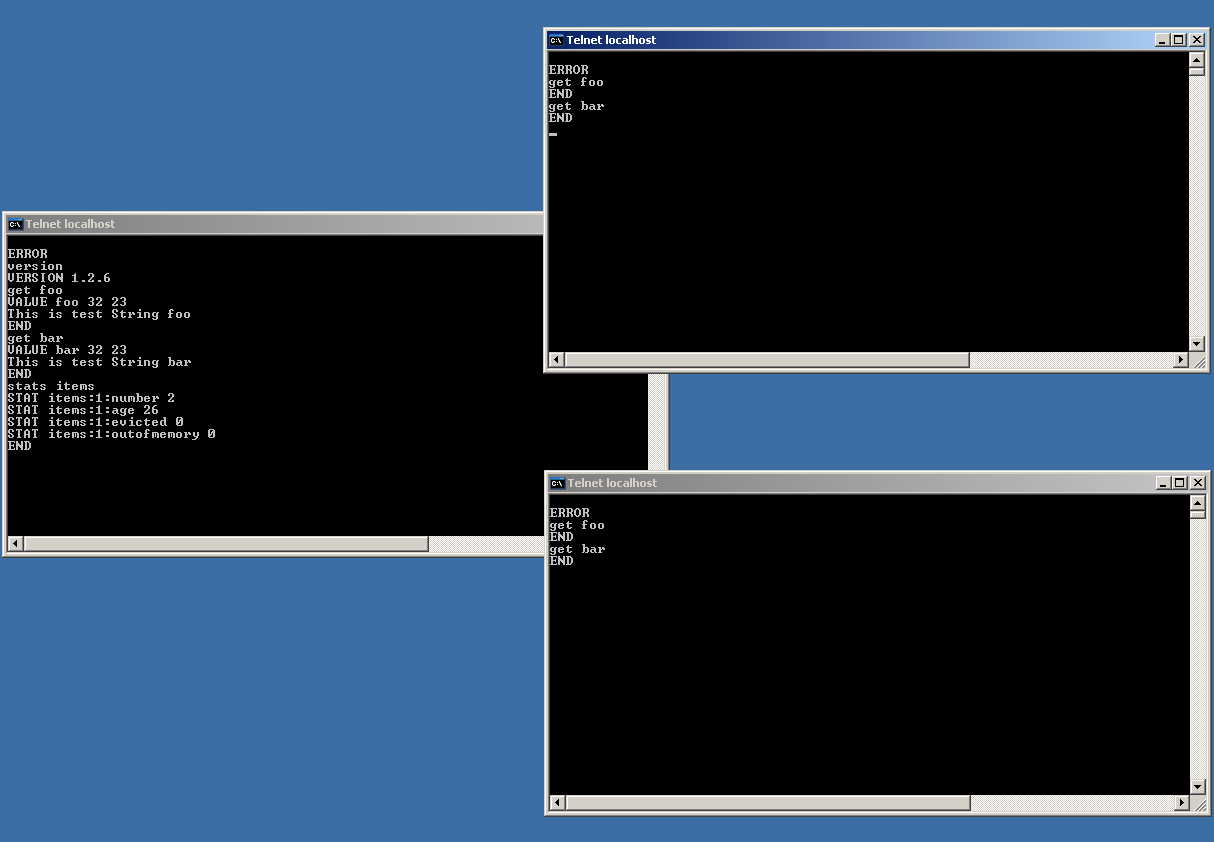
Memcache telnet interface
Memcached is so simple and easy to setup and use that one can install it on commodity machines and keep adding more machines to the memcached cluster (as load goes up) – and you can pretty much have a very cost-effective and scalable solution to handle large amounts of load.
More on this in the next post. Until next time, stay tuned.
Using Map/Reduce for Sorting
Filed under: software | Tags: hadoop, map-reduce, mapreduce, sorting
Comments (3) In my previous post – Demystifying Map/Reduce – I had talked about what is Map/Reduce and a couple of its applications : word counting and PageRank. In this post I will try to go over a couple of sorting applications of Map/Reduce.
Let us imagine that we have a huge dataset (i.e. 100s of files, and each file itself is also quite big) of integers that we have to sort. One can use any number of sorting algorithms from literature including external sort (see previous post) to sort these files without assuming anything about the data. Now if the data itself were not widely distributed i.e. the integers lie between a certain range and this range is quite small compared to size of the data, then we can use Map/Reduce. Let us see why with the help of an example.
Let us assume that our data set (integers) is constrained between 100 to 200 and we have 5 files each containing 1000 random integers between 100 and 200 (so a total of 5000 integers between 100 and 200). We read each file into a Map and then in the Reduce phase, we produce a final Map which contains the count of all the integers. Now if we sort all the integers from the final Map and output it
into a list data structure in the form of <Integer, Count> then we have sorted all the data (see figure below). Aside : In Java, you don’t even have to come up with the data-structure that I am talking about, if you just use a TreeMap in the final Reduce phase, then all the keys (i.e. data) are already sorted as long as the key type (e.g. String, Integer, etc.) implements the Comparable interface (Hadoop has something similar called WritableComparable and I am using a TreeMap that takes Strings as keys in Reducer.java).

Sorting using Map/Reduce
What is the complexity of the above sorting algorithm ? The Map phase is an order “n” algorithm (where n is the size of the data). The reduce phase is an order “m” algorithm where “m” is the number of unique integers in our data set. The sort phase after the Reduce phase will be an order “mlogm” operation (if use a sort algorithm like heap sort). Now if “m” is small compared to “n” (e.g. the size of the data set is 100,000 and the actual number of unique integers is only 100), then the complexity of the Reduce phase and final sort phase is actually quite small compared to the Map phase. So the total complexity of a Map/Reduce phase is of order “n” if the number of unique integers is quite small compared to the size of the total number of integers to be sorted. However, if the number of unique integers is comparable to the size of the data, then the complexity of the Reduce phase and the final sort phase is no longer small (compared to the complexity of the Map phase) and hence it is better to use a traditional sort algorithm instead of using Map/Reduce (to avoid the overhead of the additional order “n” Map phase).
The Map/Reduce project has an example that reads integers from five files (each containing 5000 integers) and sorts them. The total number of unique integers is 20 and the figure below shows the output of the result in “Integer (Count)” format. As one can see the output is sorted and the sum of counts adds up to 25,000 (the size of the data set – 5000 integers in 5 files). It is a small and trivial example but I hope you find it useful to understand the application of Map/Reduce to sorting.

Sort result using Map/Reduce
Until next time. Cheers !!


 Kartick Suriamoorthy's Blog