Archive for the ‘java’ Tag
Web/App-server scalability with memcached (Part 1)
Filed under: software | Tags: cache, caching, java, memcache, memcached, scalability, web applications
 Comments (1)
 This is a two part series in which I am going to explain how to use caching to improve the scalability of your web applications. Most of this can be found on the Internet as different articles or blogs and I have tried to condense all the information from my experiences into these posts. In this post I will try to describe the problem and provide a brief introduction/tutorial on the caching framework (or is it a tool) of my choice – memcached.
A typical web-based application – unless it is really really trivial – usually has a significant number of users using the application and hence at some point of time or other, one has to address the issue of application scalability (i.e. handling large load – usually large number of users simultaneously using the system). Let us walk through a couple of examples to provide a better description of what I am trying to say here.
Let us consider an e-commerce site like Target and when each user visits the main web page (www.target.com), the web-server needs to figure out what are the specials being advertised (as big flash ads, e.g. HDTV, Indoors, etc.), what are the “New Products” at Target, and so on. The web-server looks up this information in a database and serves up these ads (with text, images, etc.). This content is pretty much static for every user who visits the main page of Target, and considering that target.com probably gets more than a million visitors per day, that is a lot of load on the database for the same kind (in fact, identical) of information. This usually implies slower response times, which in turn has disastrous consequences (customers who are ready to pay for something usually have very little patience with slow websites).
Now let us consider an online brokerage site where an user logs in and is presented with a summary of his/her net value (cash + stock), and then he/she can click on various tabs to view cash deposits/withdrawals, recent stock transactions, place trades, and so on. Once again all this information is stored in the database, and this is different from the Target example, as the information will be different for every user that is logged in. And once again when there are a lot of users logged in, the database will have a lot of load (i.e. lot of queries executed against it) when these users go about clicking on different tabs to look at their total assets or trade history.
The most common solution to both of the above problems is caching, and that is what I am going to talk about in these series of posts – specifically about implementing a distributed caching solution using memcached. The memcached project was started at Danga but is currently being actively hosted on Google Code. I haven’t seen any binary downloads offered (yet) on the downloads page, but one can play around with a Win32 binary (version 1.2.6) from here. Just go to the middle of the page where it says memcached-1.2.6 and click on the memcached-1.2.6-win32-bin.zip link. Just unzip the download and place the memcached.exe at an appropriate location on your computer (see image below).

Memcached unzipped and saved
Now you can start memcached by bringing up a command prompt (cmd window) and typing : “memcached -m 1024 -p 11211”. This starts memcached on your local machine on port 11211 and assigns it 1024 MB (1 GB) of memory (this is the maximum amount of memory it uses for storing objects in its cache). You can start storing objects in memcached by using various client APIs (PHP, Perl, Java, etc.) – I prefer coding in Java, so I decided to use the Java client API (Version 2.0.1.) from here. This how-to is really useful, and since I don’t have access to multiple machines (on which I can run memcached), I basically start three different instances of memcached on the same machine but on different ports (see image below). Then I use a java class (see code snippet below – slightly modified from the how-to) to add a couple of objects (key:”foo”, value:”This is test String foo”, and key:”bar”, value:”This is test String bar”) and retrieve them from the cache.

Memcached running on different ports
Sample client code that adds and retrieves objects from memcached cluster.
package org.karticks.memcache;

import com.danga.MemCached.MemCachedClient;
import com.danga.MemCached.SockIOPool;


// Modified version of the original example at
// http://www.whalin.com/memcached/HOWTO.txt
public class ClientExample
{
	// create a static client as most installs only need a single instance
	protected static MemCachedClient mcc = new MemCachedClient();

	// set up connection pool once at class load
	static
	{

		// server list and weights
		String[] servers = { "localhost:11211", "localhost:11212", "localhost:11213" };

		Integer[] weights = { 3, 3, 2 };

		// grab an instance of our connection pool
		SockIOPool pool = SockIOPool.getInstance();

		// set the servers and the weights
		pool.setServers(servers);
		pool.setWeights(weights);

		// set some basic pool settings
		// 5 initial, 5 min, and 250 max conns
		// and set the max idle time for a conn
		// to 6 hours
		pool.setInitConn(5);
		pool.setMinConn(5);
		pool.setMaxConn(250);
		pool.setMaxIdle(1000 * 60 * 60 * 6);

		// set the sleep for the maint thread
		// it will wake up every x seconds and
		// maintain the pool size
		pool.setMaintSleep(30);

		// set some TCP settings
		// disable nagle
		// set the read timeout to 3 secs
		// and don't set a connect timeout
		pool.setNagle(false);
		pool.setSocketTO(3000);
		pool.setSocketConnectTO(0);

		// initialize the connection pool
		pool.initialize();

		// lets set some compression on for the client
		// compress anything larger than 64k
		mcc.setCompressEnable(true);
		mcc.setCompressThreshold(64 * 1024);
	}

	// from here on down, you can call any of the client calls
	public static void main(String[] args)
	{
		try
		{
			String input = args[0];

			if (input.equalsIgnoreCase("one"))
			{
		        mcc.set("foo", "This is test String foo");
				String foo = (String) mcc.get("foo");
				System.out.println("Value of foo : " + foo + ".");

				Thread.sleep(10000);

				String bar = (String) mcc.get("bar");

				System.out.println("Value of bar : " + bar + ".");
			}
			else if (input.equalsIgnoreCase("two"))
			{
		        mcc.set("bar", "This is test String bar");
				String bar = (String) mcc.get("bar");
				System.out.println("Value of bar : " + bar + ".");

				Thread.sleep(10000);

				String foo = (String) mcc.get("foo");

				System.out.println("Value of foo : " + foo + ".");
			}
			else
			{
				System.out.println("Invalid input parameter (" + input + ").");
			}
		}
		catch (Throwable t)
		{
			System.out.println("Caught an exception. Error message : " + t.getMessage() + ".");
			t.printStackTrace();
		}
	}
}
The nice thing about memcached is that it has a telnet interface by which you can test the cache. One can telnet to a memcached instance (e.g. telnet localhost 11211) and execute various commands. In my case, I telnet-ed to each of my memcached instances and typed “get foo” and “get bar”. One of my memcached instances has cached these objects and printed out their values. It is interesting to note that only one of the instances had cached these values and not all the instances. So if the instance that is holding your cached object goes down, and you cannot get back a value, you basically treat it as a cache-miss, and get the object from the real-persistence-layer and store it back in memcached. Note : As a best practice (regardless of whether you are using consistent hashing or not), you will need to detect that one of your memcached servers went down, and you will need to have a hot-standby (with the same IP / Hostname).
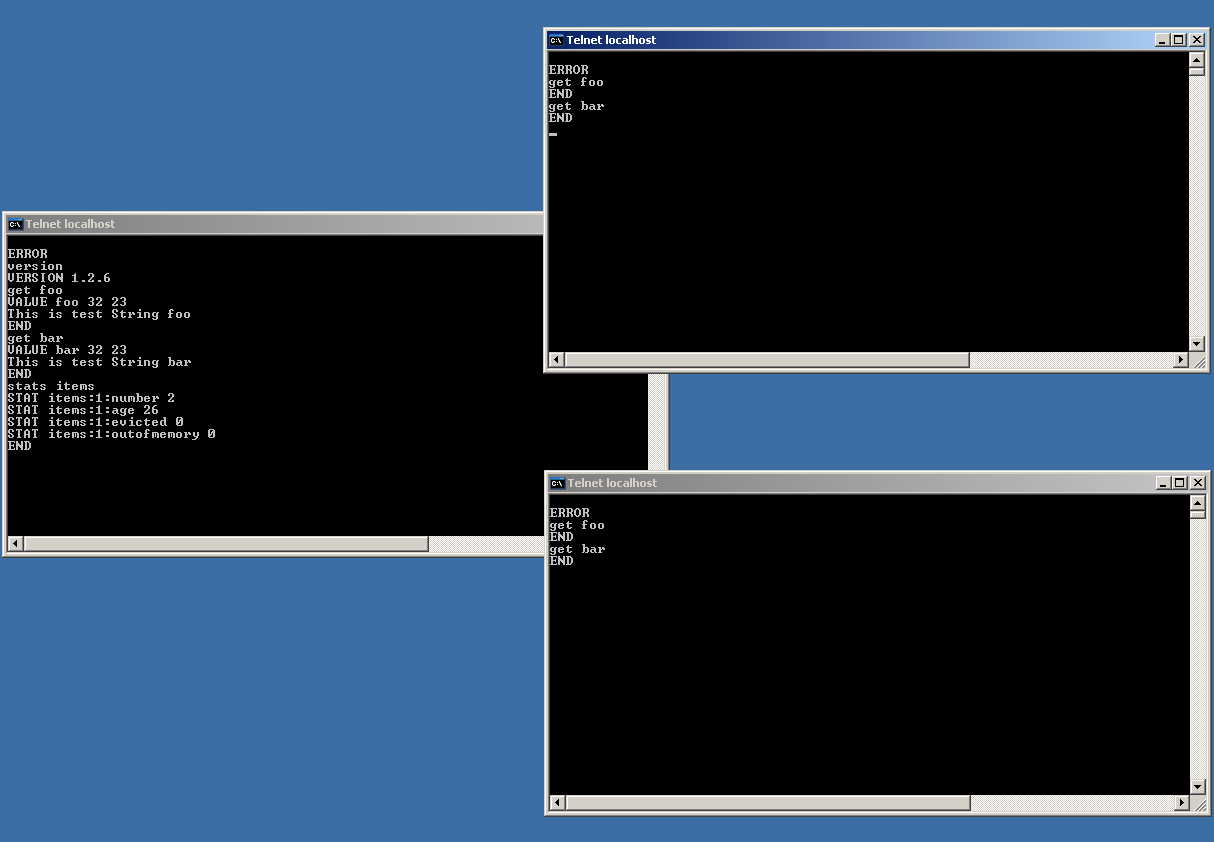
Memcache telnet interface
Memcached is so simple and easy to setup and use that one can install it on commodity machines and keep adding more machines to the memcached cluster (as load goes up) – and you can pretty much have a very cost-effective and scalable solution to handle large amounts of load.
More on this in the next post. Until next time, stay tuned.
“Communications of the ACM” articles …
Filed under: software | Tags: api, concurrency, hibernate, java, sockets
Leave a comment For the last one year or so, I have been an avid reader of the “Communications of the ACM” Magazine (http://cacm.acm.org/). I find it quite refreshing that in every issue there are atleast a few articles that are relevant to every day software development and in this post, I have made a short-list of articles that I found really interesting as well as useful.
Whither Sockets : A look at the Sockets API, its origins, how it has evolved, and its drawbacks (June 2009, Vol.52, No.6).
API Design Matters : An extremely well written article on how to design APIs (May 2009, Vol. 52, No.5).
Scalable Synchronous Queues: This article is not available in its entirety on the website (need to be a member). So I have linked it to a PDF from the author’s website (May 2009, Vol. 52, No.5).
ORM in Dynamic Languages : A fascinating article on how Hibernate is used in GORM (the persistence component of Grails). So many of these ideas can be quite easily transferred over to Java and make Hibernate usage a lot easier in Java (April 2009, Vol.52, No.4)
Concurrent Programming with Erlang : Once again, a member-only accessible article, but available via ACM Queue (March 2009, Vol.52, No.3).
Happy reading !!
Hibernate Bidirectional One-To-Many Mapping via Annotations
In one of my previous posts, I had talked about handling inheritance with Hibernate Annotations. We had talked about an AccountTransaction entity that had two sub-classes, MoneyTransaction and StockTransaction. In this post, I am going to talk about how we are going to link the AccountTransaction entity with the Customer entity.
As always, all the code mentioned here is available via the Google Code Project – DalalStreet.
Let us first start by asking the question – Why would one want to link the AccountTransaction entity with the Customer entity. Well, since we are building stock portfolio management software, it would be interesting to know the transactions (stock as well as money) for a specific customer. This naturally leads one to model this relationship as a one-to-many relationship i.e. a Customer has many (more than zero) AccountTransactions. Is this the only way this relationship can be modeled ? What if I wanted to find out the Customer information from an AccountTransaction ? Why would anyone want to do that ?
Consider the following use case : Let us say one day DalalStreet becomes quite a popular software package, and it is used by an Indian bank to handle the portfolios of its clients. Now, if a top-level manager in this bank wants to find out who were the top-10 clients who had the maximum amount (in terms of actually money traded) of transactions in the last 24 hours, how would you go about finding that information ? You would get all the AccountTransactions in the last 24 hours, and for each AccountTransaction you would find the Customer, and group all the AccountTransactions that belonged to a Customer, and then find out the top-10 Customers. The phrase that is highlighted in bold-text is possible only when you can access the Customer object from the AccountTransaction object. This can be modeled in Hibernate as a bi-directional one-to-many relationship.
So how do we go about doing this bi-directional one-to-many thing-a-majig ?
In the Customer class, you introduce a one-to-many relationship with the AccountTransaction class (see the code snippet below).
	@OneToMany (cascade = {CascadeType.ALL}, fetch = FetchType.EAGER)
	@JoinColumn (name = "customer_id")
	@org.hibernate.annotations.Cascade(value = org.hibernate.annotations.CascadeType.DELETE_ORPHAN)
	private Set  accountTransactions;

       ...
	public void setAccountTransactions(Set  accountTransactions)
	{
		this.accountTransactions = accountTransactions;
	}

	public void addAccountTransaction(AccountTransaction transaction)
	{
		if (accountTransactions == null)
		{
			accountTransactions = new HashSet();
		}

		accountTransactions.add(transaction);
	}

	public Set  getAccountTransactions()
	{
		return accountTransactions;
	}
And in the AccountTransaction class, you model the bi-directional relationship using the following annotations.
	@ManyToOne
	@JoinColumn (name = "customer_id", updatable = false, insertable = false)
	private Customer customer;

        ....

	public Customer getCustomer()
	{
		return customer;
	}

	public void setCustomer(Customer customer)
	{
		this.customer = customer;
	}
That is all, and you are done – atleast with the annotations. There a couple of things to keep in mind, when you are actually persisting these objects into the database. Let us take a quick look at some persistence code :
		Customer customer = setupSingleCustomer();

		// save an object
		Session session = HibernateUtil.getSessionFactory().openSession();
		Transaction tx = session.beginTransaction();

		Long custID = (Long) session.save(customer);

		tx.commit();

		MoneyTransaction mt1 = new MoneyTransaction();
		...
		MoneyTransaction mt2 = new MoneyTransaction();
		...
		StockTransaction st1 = new StockTransaction();
		...
		StockTransaction st2 = new StockTransaction();
		...
		StockTransaction st3 = new StockTransaction();
		...
		// need to do this - otherwise customer id shows up as null
		customer.addAccountTransaction(mt1);
		customer.addAccountTransaction(mt2);
		customer.addAccountTransaction(st1);
		customer.addAccountTransaction(st2);
		customer.addAccountTransaction(st3);

		// save the account transactions - need to use the same session
		Transaction newtx = session.beginTransaction();

		Long id1 = (Long) session.save(mt1);
		Long id2 = (Long) session.save(mt2);
		Long id3 = (Long) session.save(st1);
		Long id4 = (Long) session.save(st2);
		Long id5 = (Long) session.save(st3);

		newtx.commit();
		session.close();

		System.out.println("IDs : " + id1 + ", " + id2 + ", " + id3 + ", " + id4 + ", " + id5 + ".");

		System.out.println("Customer id : " + custID);
There are two things to keep in mind when trying to persist the AccountTransaction objects :
- One should always add the AccountTransaction object to the Customer object (lines 21-26 in the above code snippet).
- One should always use the same session to persist the AccountTransaction object – the same session that was used to retrieve the Customer object from the database (the session object used in line 29 of the above code snippet is the same as the one created in line 04). Otherwise there will be no association in the database between the related entities. To understand the relationship between Hibernate objects and sessions, I strong encourage you to read pages 42-46 from James Elliott’s classic : “Hibernate – A Developer’s Notebook”.
Finally, here are the links to the files in case you want to take a detailed look at the code.
Hibernate One-to-One Mapping using Annotations
In an earlier post I had written about getting your development environment setup to start using Hibernate. I had talked about generating a schema, and now it makes sense to proceed to the next logical step, which is persisting data.
As usual, all the code discussed in this post is available at the Google Code Project – DalalStreet.
The objective of this post is to successfully persist a heirarchy of objects using Hibernate. The model consists of a Customer entity, this Customer entity contains an Address entity and a ContactInformation entity. The Address or ContactInformation entity cannot exist independently without a Customer – or in other words – Customer has a one-to-one relationship with Address and ContactInformation.
Hibernate documentation along with a couple of blogs (1, 2) provide insufficient information on how to model one-to-one relationships in Hibernate.
Unfortunately modeling one-to-one relationships in Hibernate is non-trivial and the correct way to model is illustrated in the following code snippets.
Source code for “Customer” entity :
@Entity
@Table(name = "entity_customer")
public class Customer
{
	@Id @GeneratedValue(strategy = GenerationType.IDENTITY)
	@Column (name = "customer_id")
	private Long id = null;

	@Column(name = "first_name")
	private String firstName = null;

	@Column(name = "middle_name")
	private String middleName = null;

	@Column(name = "last_name")
	private String lastName = null;

	@Column(name = "salutation")
	private String salutation = null;

	@Column(name = "account_number")
	private String accountNumber = null;

	@OneToOne(cascade=CascadeType.ALL)
	@JoinColumn (name = "customer_id")
	private Address address = null;

	@OneToOne(cascade=CascadeType.ALL)
	@JoinColumn (name = "customer_id")
	private ContactInformation contactInfo = null;
Source code for “Address” entity :
@Entity
@Table(name = "entity_address")
public class Address
{
	@Column(name = "street_address1")
	private String streetAddress1 = null;

	@Column(name = "street_address2")
	private String streetAddress2 = null;

	@Column(name = "city")
	private String city = null;

	@Column(name = "state")
	private String state = null;

	@Column(name = "postal_code")
	private String postalCode = null;

	@Column(name = "country")
	private String country = null;

	@Id
	@GeneratedValue(generator = "foreign")
	@GenericGenerator(name = "foreign", strategy = "foreign", parameters = { @Parameter(value = "customer", name = "property") })
	@Column(name = "customer_id")
	// this is id of the customer - as an address is always associated with a
	// customer (it cannot exist independent of a customer)
	private Long customerID = null;


	@OneToOne
	@JoinColumn(name = "customer_id")
	// reference to the customer object. hibernate requires two-way object
	// references even though we are modeling a one-to-one relationship.
	private Customer customer = null;
In plain-speak this translates into the following :
Address does not have its own “ID” attribute. It will use the “ID” of the
Customer and the Customer table and the Address table are joined via this
“ID” attribute (i.e. “customer_id”).
Test code :
	private void testSingleObjectPersistence()
	{
		Customer customer = setupSingleCustomer();

		// save an object
		Session session = HibernateUtil.getSessionFactory().openSession();
		Transaction tx = session.beginTransaction();

		Long custID = (Long) session.save(customer);

		tx.commit();
		session.close();

		System.out.println("Customer id : " + custID);
	}

	private Customer setupSingleCustomer()
	{
		Address address = new Address();
		address.setCity("Austin");
		address.setCountry("U.S.A");
		address.setPostalCode("78701");
		address.setState("Texas");
		address.setStreetAddress1("301 Lavaca Street");

		ContactInformation ci = new ContactInformation();
		ci.setEmailAddress("info@gingermanpub.com");
		ci.setWorkPhone("512-473-8801");

		Customer customer = new Customer();
		customer.setAccountNumber("90000200901");
		customer.setFirstName("Gingerman");
		customer.setLastName("Pub");
		customer.setMiddleName("Beer");
		customer.setSalutation("Sir");
		customer.setAddress(address);
		customer.setContactInfo(ci);

		address.setCustomer(customer);
		ci.setCustomer(customer);

		return customer;
	}
Once all the above changes have been made, Hibernate is actually able to persist the objects.
Here are the links to the files in case you want to take a detailed look at the code.
Hopefully you found this post helpful, and as always, please feel free to leave your feedback …
Your first cup of Hibernate …
Hibernate is pretty much the defacto tool/library/framework to implement Object Relational Mapping (ORM) in Java nowadays and it has definitely become a much larger project than when I first started using it in 2004. It has so many downloads (Core, Annotations, Shards, etc.) and so many jars and dependencies that it is quite difficult to decide what is required and what is not required (and what is important and what is optional).
Here I try to provide some clarity by starting with a basic Hibernate project and slowly working up (using more advanced features of Hibernate) and in the process discovering the different features of Hibernate (and their dependencies).
All the code mentioned here is available via the Google Code Project – DalalStreet.
So let us start from scratch – which means no downloads from hibernate.org, unless we absolutely need it – and proceed step by step :
- I downloaded Eclipse 3.4.1 and created a Java Project – DalalStreet.
- I decided to use Java annotations and Eclipse immediately gave me an error (see screenshot below)
- This can be resolved by adding ejb3-persistence.jar to the classpath of your Eclipse project. For this you need to download the hibernate annotations (I decided to use version 3.2.1 – pay special attention to the compatibility matrix) and the ejb3-persistence.jar is located in the lib folder.
- After finishing all the annotations, you will want to export the schema, but before you can do that you need to define a hibernate config file.
- To export the schema, I decided to use the Ant HibernateToolTask. Of course Ant didn’t know where to find this class. For this, you need to download the hibernate tools (I am using version 3.2.4), unzip it, and navigate to the plugins folder. Now navigate to the lib/tools folder inside the org.hibernate.eclipse_<version_number> folder and you will find hibernate-tools.jar (add this to the classpath of ANT).
- After you have added the hibernate-tools.jar to the classpath you will require the following jars (to be added to the classpath of ANT)
- hibernate3.jar from hibernate core (for obvious reasons, download hibernate core and add hibernate3.jar – found in the top level folder)
- commons-logging-1.0.4.jar (in the above hibernate core download, lib folder)
- hibernate-annotations.jar (in hibernate annotations download, root folder)
- dom4j-1.6.1.jar (in hibernate core download, lib folder)
- commons-collection-2.1.1.jar (in hibernate core download, lib folder)
- freemarker.jar (in the hibernate tools download, inside the lib/tools folder of the org.hibernate.eclipse_<version_number> folder)
- and finally the jdbc driver jar which is of course dependent on the database you are using (I am using the MySQL database and the following driver jar : mysql-connector-java-5.1.7-bin.jar)

Annotation Errors
Once you have all this in place, your ANT task should complete successfully and you should have a valid schema in your database.
A final screenshot with all the jars in your lib folder :

Hibernate and dependent jars
Hope you found this post helpful. The next post will discuss the next logical step – actually persisting some data into the database using Hibernate.
Java Authentication Explained (using JAAS)
Getting back to blogging after a long long time !!
There is enough literature about Java Authentication and Authorization Service (JAAS) and most application servers have rich support for different types of authentication. But what really happens under the covers ? And there is no better way to find out than writing a custom login module to authenticate an user using JAAS.
All the sample code discussed in this blog can be viewed at the Google Code project –DalalStreet.
The first step is to define a jaas.conf and this is how the file looks :
DalalStreet {
org.ds.auth.DSLoginModule required;
};
where org.ds.auth.DSLoginModule is the custom login module that contains the code to handle the customized authentication. The login module implements the following methods :
– initialize (gets the callback handler – to get usernames/passwords, etc.)
– login (self-explanatory and the most important method)
– commit (called when login succeeds)
– abort (called when login or commit fails)
– logout
The rest is explained in the short video – less than 10 minutes – below (the video shows a debugging session, so if you want to clearly see the lines of the code, breakpoints, variable values, etc. then it is best viewed in HD mode).
What we have discussed above is a very simple example, and I am sure you could have written code to capture/request the username/password from the user and written code to validate it against a well known set of usernames and password (e.g in a database). So what is it that makes JAAS so special ?
– The most important advantage of using JAAS is that you can switch the login modules (i.e. swap the implementation class) without any code changes. That means if your LoginModule implementation currently authenticates a user via TACACS and tomorrow it has to use LDAP, you just have to write a class that handles the LDAP authentication and modify the jaas.conf to contain the new implementation class and you really don’t have to change a single line of code in your application (it is really that simple).
– even the callback handler can be configured (e.g. by a simple property or Spring) and you can decide to change how you request your user’s credentials.
So hopefully you found this post (and the video) useful/helpful. Here are the links to the files in case you want to take a detailed look at the code.
– org.ds.auth package (where most of the files are located)
– resources folder (where jaas.conf is located)


 Kartick Suriamoorthy's Blog